ClothMatics Back to ClothMatics
CLOTHMATICS CAMERA GUIDE

Take better
outfit photos

Clear framing helps ClothMatics understand the clothes you want to save or check. Use these quick guides before opening Camera in the mobile app.

See the quick checklist
QUICK CHECK

Before you take the photo

  • Full-bodyInclude the complete outfit and shoes.
  • BrightUse even light from the front.
  • SharpFocus and keep the camera steady.
  • One personKeep other people outside the frame.
  • Simple backgroundChoose a clear, uncluttered space.
01 · ADD TO CLOSET

Capture the complete look

Use this when saving clothes from a full-body outfit photo.

Add to Closet: full outfit, shoes, neutral stance, and even front lighting.
  1. Keep the complete outfit and shoes inside the frame

    Step back until the top of the head and both shoes have comfortable space around them.

  2. Stand straight with arms slightly away

    Leave a small gap between the arms and body so garment edges remain visible.

  3. Use even front lighting

    Face the main light source. Avoid bright windows or lamps directly behind you.

  4. Photograph one person only

    Keep other people, reflections, and large distractions outside the frame.

02 · STYLE CHECK

Make fit and proportion easy to see

A neutral, clear photo makes style feedback more useful.

Style Check: clear full look with no filters, mirrors, motion blur, or covered garments.
  1. Show the whole outfit clearly

    Include every important layer, the complete silhouette, and footwear.

  2. Avoid mirrors, filters, and motion blur

    Use the regular camera view and wait for focus before taking the photo.

  3. Keep garments uncovered

    Move bags, crossed arms, furniture, and other objects away from the outfit.

  4. Use a neutral pose

    Face the camera naturally so fit, length, and proportions are visible.

03 · SINGLE GARMENT

One garment, every edge visible

Use a flat surface or hanger and keep the shape easy to separate from the background.

Single Garment: one complete item, laid flat or placed on a hanger, with clear edges.
  1. Use one complete garment per photo

    Do not photograph a pile, folded stack, or multiple separate pieces together.

  2. Lay it flat or place it on a hanger

    Straighten the fabric so the garment’s true shape and length are visible.

  3. Keep every edge visible

    Leave clear space around sleeves, hems, straps, and collars.

  4. Avoid overlapping objects

    Remove hands, accessories, furniture, and other garments from the item.

FAST VISUAL CHECK

Good photo or try again?

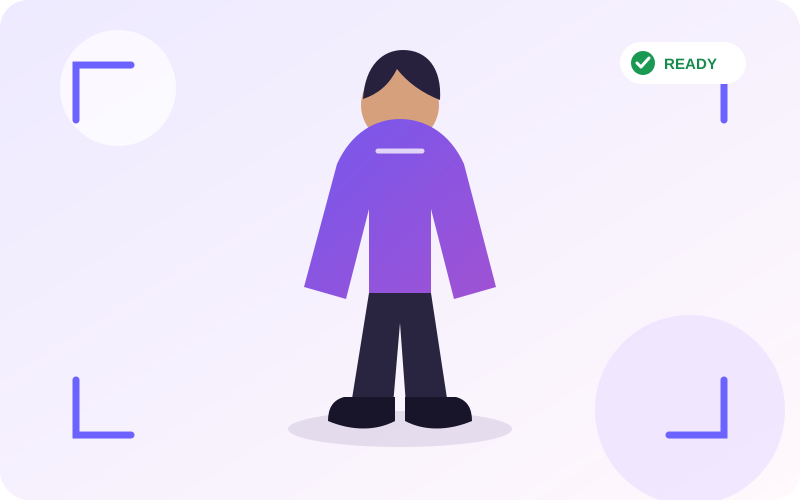
✓ GOOD PHOTO

Clear from head to shoes

Bright front light, neutral pose, sharp focus, and breathing room around the outfit.

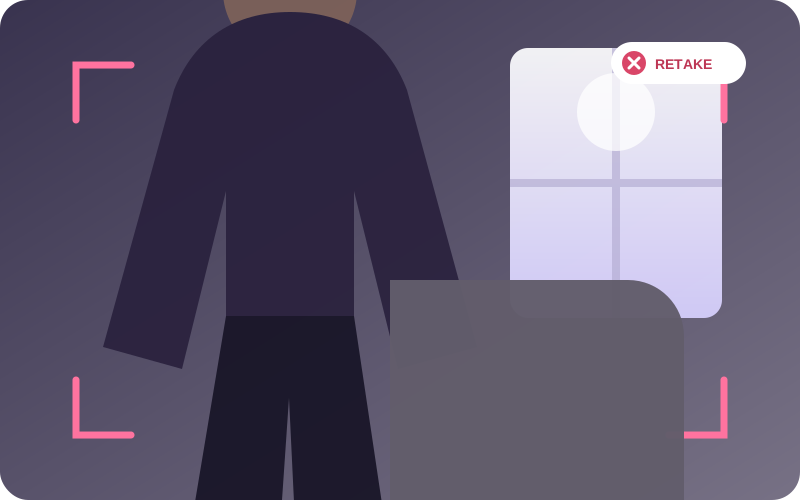
× TRY AGAIN

Cut off and backlit

Shoes are missing, the subject is dark, and background objects overlap the outfit.

QUICK FIXES

Troubleshooting

Open a question to see the recommended next step.

Camera permission is blocked

Open your phone Settings, find ClothMatics, and allow Camera access. Return to the app and open Camera again.

Gallery permission is blocked

Open your phone Settings, find ClothMatics, and allow Photos or Gallery access. You can choose limited or full access where supported.

The photo looks blurry

Clean the lens, add more light, hold the phone steady, tap the garment to focus, and wait a moment before taking the photo.

Clothing is cut off

Move farther away or rotate the phone if needed. Keep the whole outfit and shoes—or every edge of one garment—inside the frame.

Processing is taking a long time

Keep ClothMatics open, check your connection, and avoid switching apps during processing. If it remains stuck, return to Camera and retry with a smaller, sharper photo.

READY TO TRY?

Return to the ClothMatics mobile app and open Camera.

Choose Add to Closet, Style Check, or Single Garment, then use the checklist before taking your photo.

Back to ClothMatics